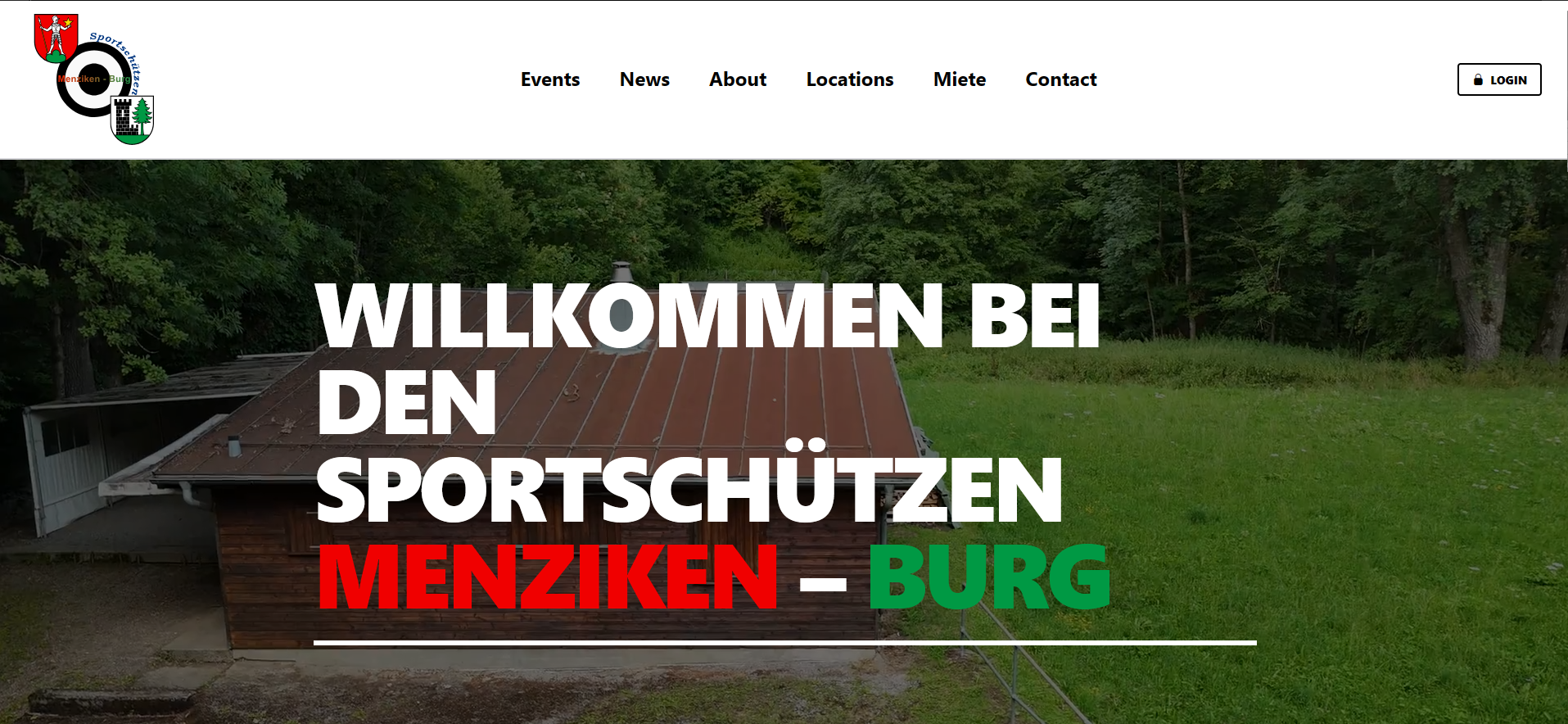
My colleagues at Sportschützen Menziken asked if I’d be interested in building a new website. The old one was terribly outdated. For me, it was the perfect side project to gain more hands‑on experience.
The False Start with WordPress
Initially, I attempted to build the site with WordPress. It did work, but I found myself constantly fighting against the CMS. The generated code felt messy, many essential plugins required payment, and I couldn’t achieve the exact design and functionality I wanted without diving deep into the WordPress ecosystem—which I had no desire to do.
Switching to Astro.js
Frustrated with WordPress, I rebuilt the site using Astro.js with Tailwind CSS. This combination worked beautifully. I could build exactly to my liking without battling a no‑code editor. I hosted the site on Cloudflare Pages, set up a redirect from the club’s domain to the Cloudflare subdomain, and added a GitHub Action to automatically deploy on every push to main.
However, this approach had its drawbacks. I still had to manually update the events section though I eased the pain by storing event data in a JSON file. Additionally, club members began requesting a password‑protected internal section. Astro.js is primarily a static site generator; while I could have built a backend using Cloudflare Workers and Hono, it felt like massive overkill for a simple club website. I suggested switching to a VPS (like Hetzner or AWS) to gain more flexibility, but as is often the case in a volunteer‑run club, decisions move slowly.
Rebuilding with PHP on Shared Hosting
Earlier this year, I had some free time and decided to rebuild the website with PHP so it could run on the club’s existing hosting plan. This meant working within strict limitations: no shell access, and many Apache and PHP settings were only configurable through cPanel. As a software developer accustomed to full control over servers and configurations, this was an unpleasant but interesting constraint.
Local Development with Docker
To mirror the production environment, I used Docker Compose to spin up a PHP‑Apache container and a MySQL instance matching the versions on the web host. This allowed me to develop locally with confidence that everything would work once deployed.
Choosing a Lean Tech Stack
Given the hosting restrictions, I had to make deliberate, lightweight technology choices:
- Framework: I ruled out Laravel and Symfony they require shell access and would be too heavy for this environment. Instead, I chose Slim PHP, a micro‑framework that handles routing and dependency injection without unnecessary bulk.
- Database Access: For the ORM, I used Illuminate\Database, Laravel’s standalone database component. It’s well‑maintained and familiar.
- Templating: Twig provides a clean, Symfony‑like templating experience.
- Frontend Styling: Tailwind CSS again—writing a custom Sass library would be overkill, and Bootstrap isn’t flexible enough for my design ideas.
- Interactivity: Alpine.js handles 90% of the required JavaScript with minimal complexity.
- Icons: Bootstrap Icons for a consistent, professional look.
- Build Tool: Vite bundles and optimizes frontend assets.
Architecture & Custom Features
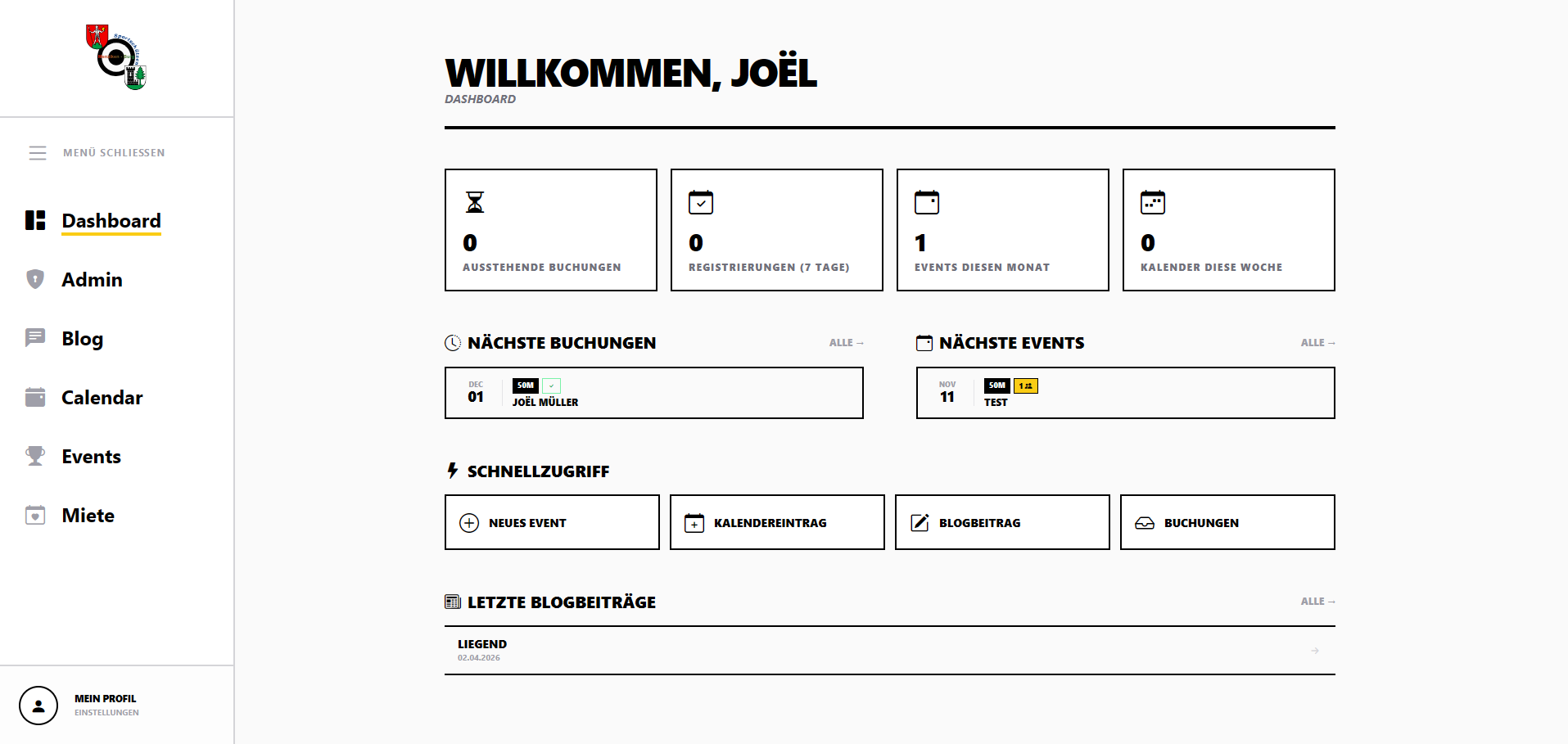
The application follows the Model‑View‑Controller (MVC) pattern and is kept in a single codebase for simplicity. Converting the Astro pages to the new stack was straightforward. Then came the more complex functionality.
Authentication and Member Validation
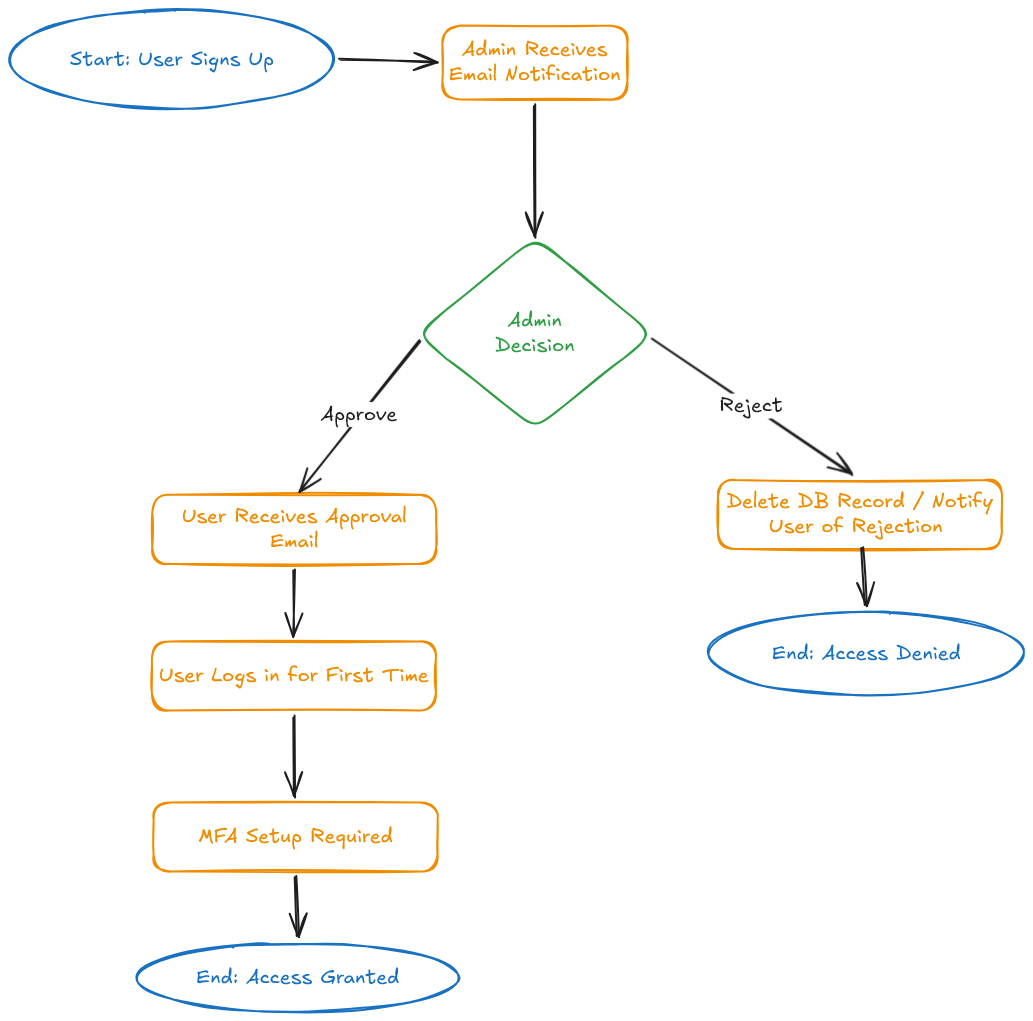
To ensure only club members can access the internal section, I built a registration approval workflow:
- New users can request an account.
- All existing admin users receive an email notification about the request.
- Admins can approve or deny the request via an internal admin panel.
- Once approved, the user receives an email and can log in.
- On first login, the user is prompted to set up multi‑factor authentication (MFA). Since PHP applications can be common targets for vulnerabilities, adding this extra layer of security seemed wise.
Admin Settings & Flexible Data Storage
One interesting challenge was building a settings section for:
- SMTP email configuration
- Site accent color
- Which members to display on the “Contacts” page
Storing this in a rigid relational schema felt messy. Instead, I created a simple key‑value table. For complex settings (like the list of contact persons), I store a JSON object in the value field. This kept the schema minimal while allowing great flexibility.
Blogging and File Attachments
The club wanted a blog feature. I integrated the Quill rich text editor. Quill generates RTF‑like strings, which I stored directly in the database. This worked fine until users started uploading larger images, which caused errors.
The Solution: I wrote a custom JavaScript function that hooks into Quill’s image button. When an image is added:
- It uploads immediately to a temporary folder.
- When the blog post is saved, the image is moved to a permanent location.
- A daily cleanup script deletes any files older than 24 hours from the temporary folder.
The same logic was extended to support PDF attachments via a custom button in the editor.
Other Modules
Beyond the blog, the site includes:
- A calendar for events
- Event registration with sign‑up forms
- A profile settings page for members
- A workflow for renting the shooting range
Using AI as a Coding Assistant
Throughout development, I experimented with OpenCode and the free Qwen 2.5 LLM. I found that AI can be remarkably effective if you give it precise, constrained instructions.
Good Prompt Example:
I want to display users. The Model is located at @/app/Models/User.php. The Controller is located at @/app/Controllers/UserController.php. My routes are in @/routes/web.php. You can get the data with a GET call on /user/getAll. In the file @/templates/admin/users.twig, after the title section, create a flexbox that displays all users. Keep in mind that I use Twig with Tailwind CSS, Alpine.js, and Bootstrap Icons.This prompt leaves almost no room for interpretation. It tells the AI exactly where the relevant files are and what technologies to use.
Bad Prompt Example:
You know my codebase, show me all users on a page and make it beautiful.This is too vague. The AI might invent its own CSS classes, use a grid when I wanted flex, or even inject a <style> block into the template.
Key takeaway: No matter how good the prompt, I always review and test the generated code rigorously.
Deployment Headaches
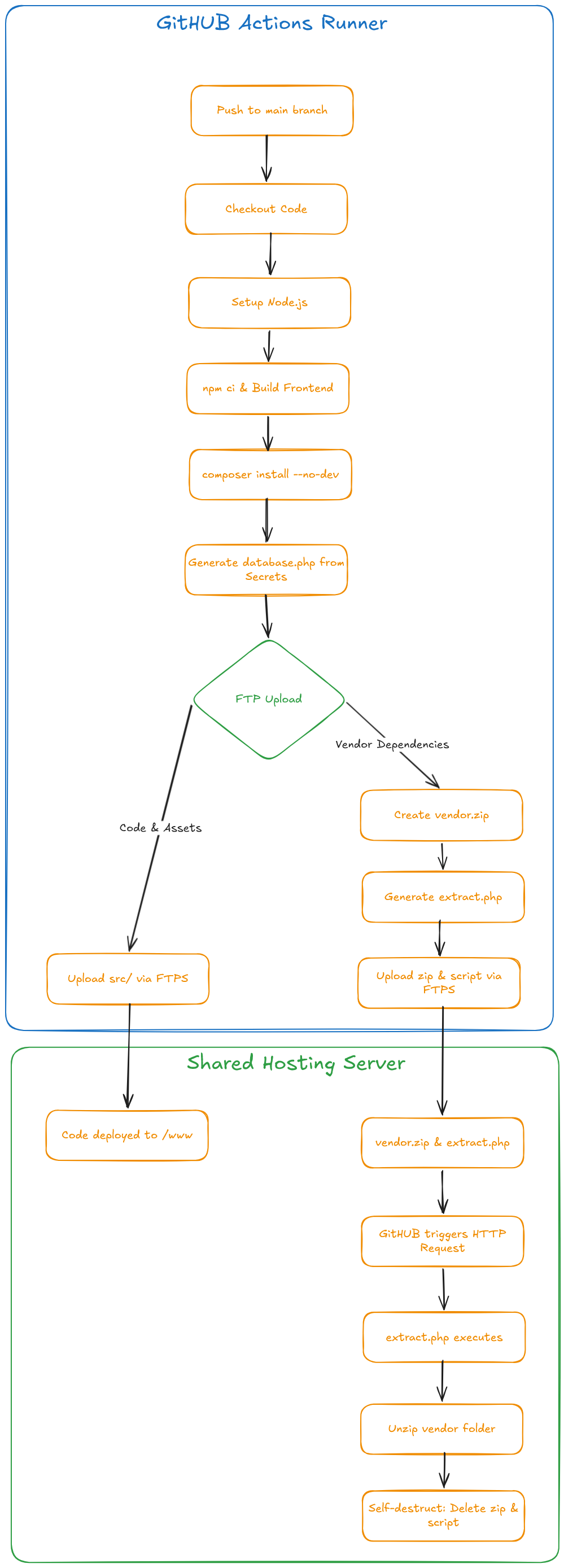
Deploying to the shared host was perhaps the biggest challenge. Access was only via FTPS (FTP over SSL). Running composer install or npm install on the server was impossible, so I had to bundle all dependencies locally and upload them.
The real problem was the size of the vendor/ folder. Uploading it directly via FTP would always time out.
The Workaround:
- A GitHub Action zips the entire
vendor/folder (dependencies). - The zip file and a small PHP script are uploaded via FTP.
- The GitHub Action triggers an HTTP request to that PHP script.
- The script extracts the zip file on the server, replacing the old version.
This was a headache that a VPS would have avoided entirely, but solving it was satisfying.
Conclusion
This project was a valuable learning experience. I gained a deep appreciation for the simplicity of Slim PHP and the power of modern frontend tools like Tailwind and Alpine.js even within the tight confines of a cPanel‑based hosting plan.
The project is currently in a final testing phase with a select group of club members to ensure everything runs smoothly in the live environment. Based on the initial positive feedback and successful completion of this staging period, the site is slated to go fully public as the club’s primary web presence.
The only remaining technical friction point is handling database migrations manually. If the club eventually moves to a more flexible hosting platform, that’s the first thing I’ll automate. Despite the constraints, the result is a fast, secure, and fully custom website that meets the club’s needs and can be managed by non‑technical members. It was a satisfying blend of pragmatic engineering and real‑world problem solving.