When I got my first smartphone, streaming services like Spotify or Apple Music weren’t really a thing yet. Back then, there were apps that let you build playlists out of YouTube videos, and they were great. You searched for a song, added it to a list, and it just played. I liked mine so much that I kept using one all the way until this year.
Then it was time for a new phone, and I ran into a problem: the app is gone from the Play Store. It still worked on my old phone, but I couldn’t install it on a new one. And that meant my playlist, 344 songs that I had collected over years, was stuck on a phone I was about to retire.
A Playlist That Doesn’t Exist as Files
The tricky part is that I never downloaded any of these songs. The playlist was only a list of YouTube videos, and every song was streamed from YouTube each time I played it. So there was nothing to copy. The only thing worth saving was the list itself, and the app had no export function.
My first thought was to grab the app’s database. The app stores files in Android/data, so I plugged in my phone and tried to copy them over USB (MTP). The main SQLite file, .persistence.db, copied fine. But the two files next to it, .persistence.db-wal and .persistence.db-shm, failed with an input/output error. These are SQLite’s write-ahead log and shared memory files. I think the app keeps them open while it runs, and MTP can’t read them reliably in that case.
Next I switched to ADB. adb pull got the main file again, but for the other two I got “permission denied”. ADB runs as the shell user, and that user is probably not allowed to open those two files. adb backup was blocked by the app too.
I wasted some time on this because I expected my playlist to be inside the WAL file. When I finally opened the database I could copy, I found a Room database with only one useful table: download_streams. It tracks downloads, not playlists. So the playlist was never in this database. It is probably in the app’s private storage, and to read that I would need root. That’s a lot of risk for a music list, so I went looking for another way.
Plan B: Teach Something to Read the Screen
If the app won’t hand over its data, I can still read what it shows me. My first attempt was low-tech: record a video while scrolling through the playlist, then run text recognition (Tesseract OCR) over the frames.
It really sucked. The text came out as one big messy pile, and I couldn’t tell where one song ended and the next began. I tried separating titles from channel names by font size, then by font color, then by spacing between lines. None of it was reliable enough. Every fix broke on a different part of the list.
The Breakthrough
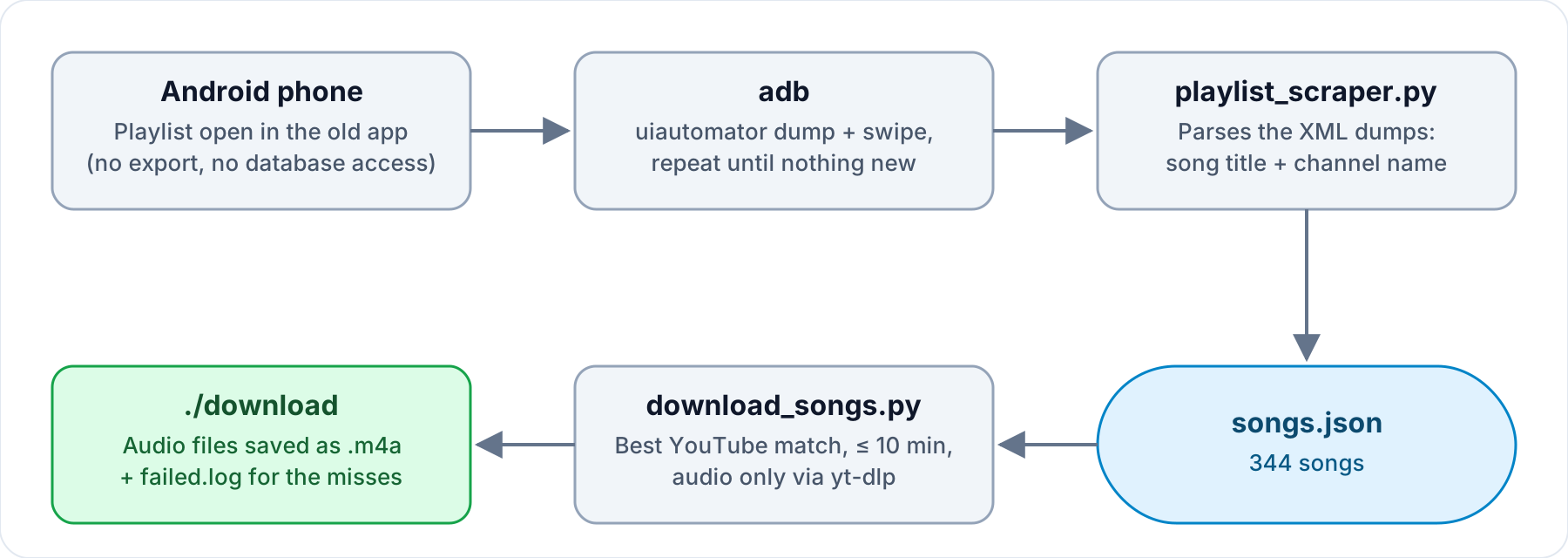
The solution that finally worked was much simpler than the video approach. Android can export the whole UI hierarchy of the current screen as XML with uiautomator dump. Every element in that XML has its text and a resource ID. In this app, the song title and the channel name have different IDs (text_title and text_channel_title), so there is no guessing at all, unlike with OCR.
There is one catch. Android lists only render the rows that are visible, so one dump only contains the songs that are on the screen right now. So the script does what I’d do by hand:
- Dump the UI to XML and read out the songs.
- Scroll down with
adb shell input swipe. - Repeat until two dumps in a row have nothing new.
A few small details made it reliable:
- In the XML, the channel always comes right after its title. So the parser walks through the nodes in document order and pairs each title with the next channel. It doesn’t need any screen coordinates.
- Each swipe is shorter than the visible list, so two dumps overlap a bit and no song falls in the gap.
- The swipe is slow on purpose. A fast swipe makes the list fling, and it can jump over rows.
- A song that shows up in two dumps is only saved once (de-duplication).
At the end, everything is written to a clean, human-readable JSON file with a title and an author (the channel name) for each entry. Watching it scroll through my playlist on its own, all 344 songs, was oddly satisfying.
Getting the Music Back
A list isn’t much use if you can’t listen to it, so I wrote a second script that goes through the JSON and downloads the audio from YouTube with yt-dlp. For each song it searches YouTube and compares the top five results with the title (fuzzy matching) and the channel name, so a slightly different title still finds the right video and most wrong ones are skipped. It ignores anything longer than 10 minutes, because those are mostly mixes. Downloads run in parallel with a thread pool. The script skips songs that are already downloaded, so I can stop it and run it again. Everything it couldn’t find goes into a log file with the reason.
Where It Ended Up
Today I use Auxio as my music player and NewPipe to download the audio straight from YouTube. The download script did its job, but the scraper is the part that mattered, because it was the one thing that got my playlist out of an app that had no way to let it go.
The solution is not perfect. It depends on the resource IDs of this one app, so a new layout would break it, and the matching on YouTube is a guess that can sometimes pick the wrong video. But the app isn’t updated anymore, and for a one-time export that was good enough.
Built with Claude
Most of the code was generated with Claude. The goal was never to build something nice, it was to solve the problem as fast as possible. Even so, finding a reliable way took some time and mostly manual labour. The version that worked was not the one I started with. I tried the video and text recognition route first and gave it up. The idea that finally solved it, scrolling with ADB and reading the screen as XML, came out of working through the problem with the AI.